
はじめに #
この演習では scikt-learn を用いて Ridge 回帰を行う.演習:多項式回帰 および 演習:scikit-learnを用いた多項式回帰 では, 9次多項式の回帰で過学習が起きていた.Ridge 回帰を用いることで過学習が抑制されることを確認する.
ここでは,ハイパーパラメータalphaの値は固定して正則化について学ぶ.ハイパーパラメータチューニングは次の 演習:Cross-validation とハイパーパラメータチューニング で行う予定である.
Jupyter Notebookでの演習を想定.下記のようにライブラリのインポートも必要. ここに出てくるグラフ出力例は Matplotlib > よく使う設定と保存 の設定も用いている.
import numpy as np
import matplotlib.pyplot as plt
from sklearn.preprocessing import PolynomialFeatures, StandardScaler
from sklearn.linear_model import Ridge
from sklearn.metrics import root_mean_squared_error
参考
演習1:標準化の練習 #
ここではデータの標準化の練習を行う.下記の行列(2次元配列)を NumPy の機能を用いて標準化する. 標準化を習ってない学生は自分で調べること. 各特徴量ごと(縦方向)に標準化を行う.
$$ X= \begin{pmatrix} 1 & 4 & 2 \\ 3 & 7 & 2 \\ 8 & 5 & 9 \end{pmatrix} $$x = np.array([[1, 4, 2], [3, 7, 2], [8, 5, 9]])
x # jupyterで出力用x = ?????? # 標準化
x # jupyterで出力用おそらく以下のような出力になるはず.
array([[-1.01904933, -1.06904497, -0.70710678],
       [-0.33968311,  1.33630621, -0.70710678],
[ 1.35873244, -0.26726124, 1.41421356]])標準化したデータzの平均と分散を確認する.
z.mean(axis=0) # jupyterで出力用z.std(axis=0) # jupyterで出力用それぞれarray([0., 0., 0.])およびarray([1., 1., 1.])とほぼ同じ値になっているはず(数値計算上の微々たる誤差は出る).
scikit-learn にデータを標準化できる StandardScaler があるのでそれを使って同じ結果になるか確認する.使い方は下記を参考にする.データ行列を入れるだけ.
ss = StandardScaler()    # インスタンスの作成
z = ss.fit_transform(x)  # fitしてtransform
z # jupyterで出力用自分で計算したzと同じ値になっているか確認する.
また,次のような計画行列を標準化しようとするとどうなるか考えること(1列目に注目).
$$ X= \begin{pmatrix} 1 & 4 & 2 \\ 1 & 7 & 2 \\ 1 & 5 & 9 \end{pmatrix} $$演習2:データの準備 #
演習:多項式回帰 および 演習:scikit-learnを用いた多項式回帰 と同様にsin関数にガウスノイズを加えたデータを10点用意する. また,今回はテストデータとしてさらに4点同様に準備して,訓練データ等と一緒にプロットする.
# ---------- training data
x_dense =  np.linspace(0, 1, 100)
y_sin = np.sin(2 * np.pi * x_dense)
rng = np.random.default_rng()
x_train = ??????
y_train = ??????
noise = ??????
y_train = y_train + noise

# ----------test data
x_test = ??????
y_test = ??????
noise_test = ??????
y_test = y_test + noise_test

# ---------- plot
fig, ax = plt.subplots(1, 1)
ax.plot(x_dense, y_sin, label=r'$\sin(2\pi x)$')
ax.plot(x_train, y_train, 'o', markeredgecolor='black', label='Training data')
ax.plot(x_test, y_test, 's', markeredgecolor='black', label='Test data')
ax.set_xlabel(r'$x$')
ax.set_ylabel(r'$y$')
ax.legend()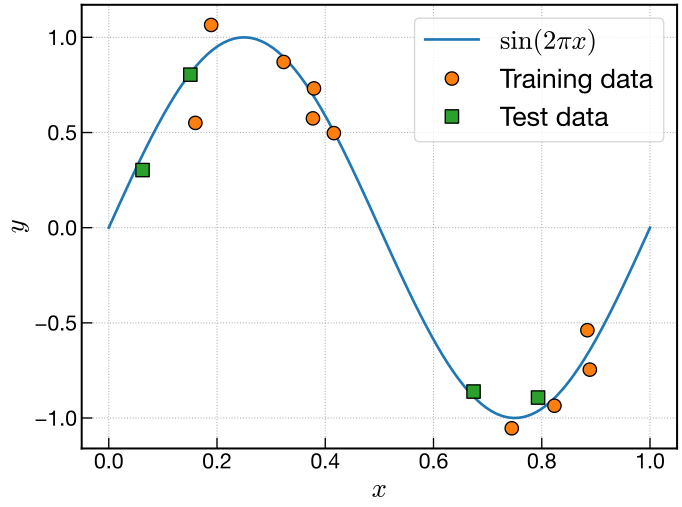
演習3:計画行列の標準化 #
Ridge 回帰ではデータを標準化する必要があるが,多項式回帰の \(x^0\) の特徴量のような定数項があると標準化できないので,定数項を除外する.
演習:scikit-learnを用いた多項式回帰 で用いた PolynomialFeatures ではinclude_bias=Falseのようにすると定数項を除外することができるので,ここではこれを用いる.
def design_matrix(x, M):
    pf = PolynomialFeatures(degree=M, include_bias=False)
    dmat = ??????
    return dmat
最小二乗法では過学習が起きていた \(M=9\) で,計画行列の shape を確認する.10行9列の行列になるはず.10行はデータ数,9列は定数項を除いた多項式の項数に対応する.
M = 9
phi = design_matrix(x_train, M)    # 計画行列
phi.shape    # jupyterで出力用
定数項が除外されて,1列分少ない10行9列になっているか確認すること.
(10, 9)後で使用するので,テストデータx_testの計画行列phi_testも同様に計算しておく.
phi_test = design_matrix(x_test, M)    # テストデータの計画行列
phi_test.shape # jupyterで出力用計画行列phiを標準化する.
ss = StandardScaler()
phi_std = ss.fit_transform(phi)同様にテストデータに対する計画行列phi_testも標準化する.ただし,テストデータは訓練データと同じスケーリングパラメーターを使う必要があるので fit_transform() はせずに,transform() だけ行うこと.上記のssにはすでに訓練データで fit した時のパラメータが格納されているので,下記のようにそれを用いて transform() だけ行う.
phi_test_std = ss.transform(phi_test) # transformのみまた,連続的な予測モデルを計算する際に,x_denseに対する標準化された計画行列phi_dense_stdが必要になるので,これもついでにここで計算しておく.
テストデータの時と同様に,fit せずにtransform()だけ行い,訓練データと同じスケーリングパラメータを用いる.
phi_dense = design_matrix(x_dense, M)
phi_dense_std = ss.transform(phi_dense)    # transformのみ
演習4:Ridge 回帰 #
標準化された計画行列phi_stdに対して, scikit-learnの Ridge クラス を用いて回帰を行う.
ただし,ハイパーパラメータalphaに関して,ここでは0.0と0.1で固定して2通りの回帰を行う.
計画行列から外した定数項の部分はfit_intercept=Trueにしてここで考慮する(デフォルトでTrueなので省略可能).
使い方は 演習:scikit-learnを用いた多項式回帰 で使った LinearRegression とほぼ同じ.
alpha=0.0
#
まずはalpha=0.0(つまり最小二乗法)から始める.
ここではインスタンス生成時にridge0という変数名を用いることにする.
ridge0 = Ridge(alpha=0.0, fit_intercept=True)    # インスタンスの作成
ridge0.fit(phi_std, y_train)        # フィッティング
これで回帰ができているので, LinearRegression のときと同様に,係数および切片(定数項)はそれぞれcoef_およびintercept_属性に格納されている.
また,訓練データに対する決定係数も下記のようにscore()メソッドを使うことで確認できる.
標準化された訓練データの計画行列phi_stdと訓練データの値y_trainを引数に入れればよい.
ridge0.score(phi_std, y_train) # 決定係数.jupyterで出力用うまく回帰できていれば0.9999といった1に近い値になる.
また,これまで同様連続的な予測モデルもプロットしたいので,事前に準備しておいたphi_dense_stdをpredict()メソッドに入れることで連続的な予測モデルy0_dense_predictを計算する.
y0_dense_predict = ridge0.predict(phi_dense_std)予測モデルが計算できたので,sin関数やデータとともにプロットする.
今はalpha=0.0で最小二乗法なので,当然過学習している結果が得られる.
fig, ax = plt.subplots(1, 1)
ax.plot(x_dense, y_sin, label=r'$\sin(2\pi x)$')
ax.plot(x_train, y_train, 'o', markeredgecolor='black', label='Training data')
ax.plot(x_test, y_test, 's', markeredgecolor='black', label='Test data')
ax.plot(x_dense, y0_dense_predict, label='Prediction')
ax.set_ylim(-1.5, 1.5)    # 過学習するのでyの描画範囲を設定しておいた方がいい
ax.set_xlabel(r'$x$')
ax.set_ylabel(r'$y$')
ax.legend(loc='upper right')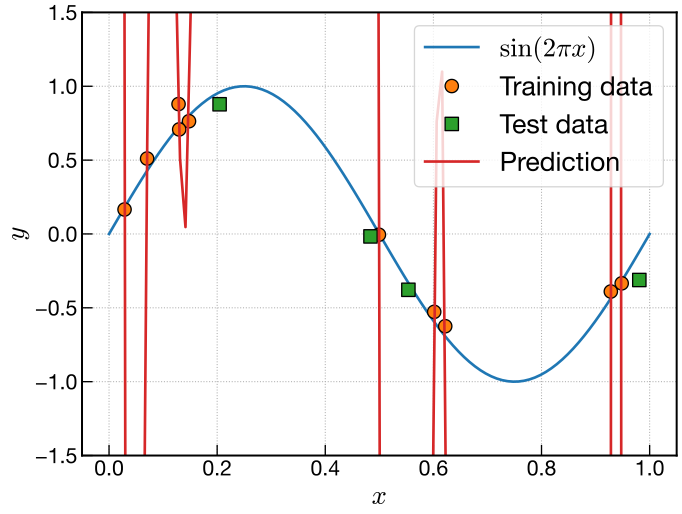
alpha=0.1
#
次にalpha=0.1にして,正則化がどう働くかを学習する.alpha=0.0のときと同じように計算して,結果をプロットすること.
ここではridge1などのxxx1といった変数名を用いることにする.
# ---------- Ridge 回帰
ridge1 = ??????    # インスタンスの作成
??????        # フィッティング
y1_dense_predict = ??????

# ---------- plot
fig, ax = plt.subplots(1, 1)
ax.plot(x_dense, y_sin, label=r'$\sin(2\pi x)$')
ax.plot(x_train, y_train, 'o', markeredgecolor='black', label='Training data')
ax.plot(x_test, y_test, 's', markeredgecolor='black', label='Test data')
ax.plot(??????, ??????, label='Prediction')
ax.set_ylim(-1.5, 1.5)
ax.set_xlabel(r'$x$')
ax.set_ylabel(r'$y$')
ax.legend(loc='upper right')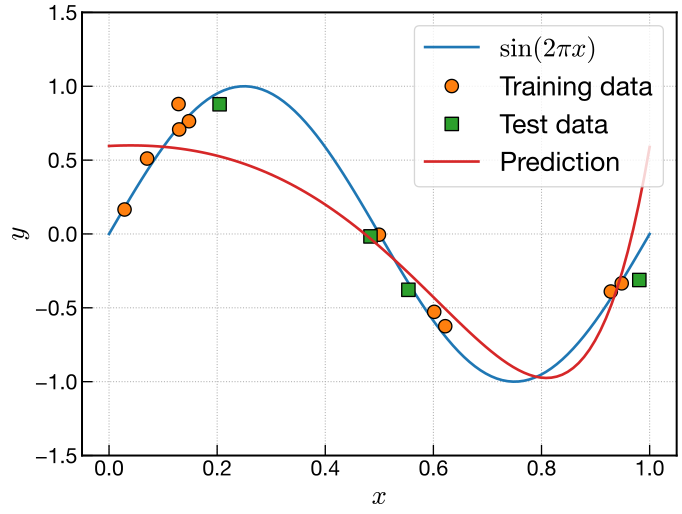
そこまで回帰結果はよくないものの,過学習が抑制されていることはわかるはず.
演習5:誤差の評価 #
Parity plot #
予測値が真の値とどれくらい合っているか可視化するために,parity plot を行う. 横軸を真の値,縦軸を予測値にしてプロットすると,予測が完全に一致していれば \(y=x\) のグラフになるので,どのくらい予測が合っているかが可視化できる.
parity plot のために訓練データ10点とテストデータ4点に対する予測値を計算する.
訓練データに対してはphi_stdを,テストデータに対しては事前に計算しておいたphi_test_stdを
predict()に入れればそのデータに対する予測値を計算できる.
alpha=0.0
y0_predict = ridge0.predict(phi_std)            # 訓練データに対する予測値
y0_test_predict = ridge0.predict(phi_test_std)  # テストデータに対する予測値
alpha=0.1
y1_predict = ridge1.predict(phi_std)            # 訓練データに対する予測値
y1_test_predict = ridge1.predict(phi_test_std)  # テストデータに対する予測値
横軸を真値,縦軸を予測値にして parity plot する.
alpha=0.0の場合は過学習していてテストデータは大きく外れるので描画範囲は広めにしておくとよい.
alpha=0.0
# ---------- setting for parity plot
# 過学習していてテストデータは大きく外れているので,描画範囲を広くしておく
x_min = y_min = -50
x_max = y_max = 50

# ---------- plot
fig, ax = plt.subplots(1, 1, figsize=(6, 6))    # parity plotでは縦横比を1:1にしておく
ax.plot([x_min, x_max], [y_min, y_max])    # y = xの基準線
ax.plot(y_train, y0_predict, 'o', markeredgecolor='black', label='Training data')
ax.plot(y_test, y0_test_predict, 's', markeredgecolor='black', label='Test data')
ax.set_xlim(x_min, x_max)
ax.set_ylim(y_min, y_max)
ax.set_aspect('equal')    # 縦横のスケールを同じにする
ax.set_xlabel('True')
ax.set_ylabel('Predicted')
ax.legend()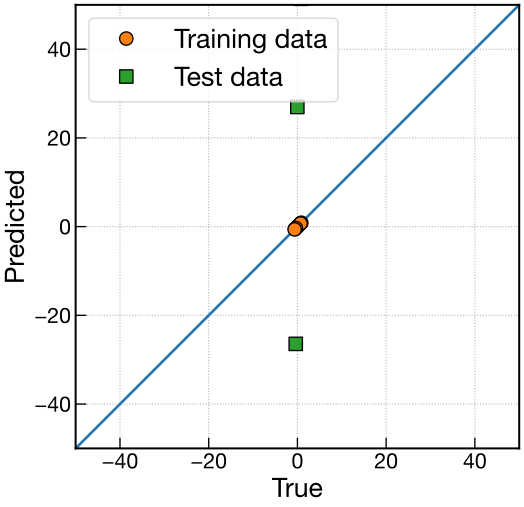
alpha=0.1
# ---------- setting for parity plot
x_min = y_min = -1.0
x_max = y_max = 1.0

# ---------- plot
fig, ax = plt.subplots(1, 1, figsize=(6, 6))    # parity plotでは縦横比を1:1にしておく
ax.plot([x_min, x_max], [y_min, y_max])    # y = xの基準線
ax.plot(y_train, y1_predict, 'o', markeredgecolor='black', label='Training data')
ax.plot(y_test, y1_test_predict, 's', markeredgecolor='black', label='Test data')
ax.set_xlim(x_min, x_max)
ax.set_ylim(y_min, y_max)
ax.set_aspect('equal')    # 縦横のスケールを同じにする
ax.set_xlabel('True')
ax.set_ylabel('Predicted')
ax.legend()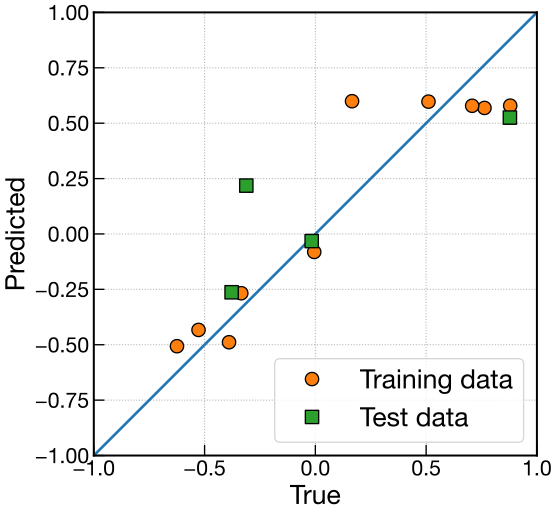
RMSE #
平均二乗平方根誤差(root-mean-square error: RMSE)を用いて誤差を定量化する. 誤差を定量化する方法は RMSE の他にも MSE や MAE がある.
scikit-learnには RMSE を計算できる root_mean_squared_error が用意されている.
すでに import してあると思うので, root_mean_squared_error(y_true, ypred)のように使えば計算できる.
alpha=0.0
print(f'Training: RMSE =  {root_mean_squared_error(??????, ??????)}')
print(f'Test: RMSE =  {root_mean_squared_error(??????, ??????)}')
出力例
Training: RMSE =  1.785522733440865e-08
Test: RMSE =  792.2491322956186
alpha=0.1
print(f'Training: RMSE =  {root_mean_squared_error(??????, ??????)}')
print(f'Test: RMSE =  {root_mean_squared_error(??????, ??????)}')
出力例
Training: RMSE =  0.19572243793782718
Test: RMSE =  0.32356534169959145