はじめに #
演習:多項式回帰 では,NumPy を用いてある程度自分でプログラムを作成したが,scikit-learn という便利な機械学習ライブラリを使えば簡単に線形回帰を行うことができるので, 使い方を覚える目的でここでも同じ多項式回帰を行う.
Jupyter Notebookでの演習を想定.下記のようにライブラリのインポートも必要. ここに出てくるグラフ出力例は Matplotlib > よく使う設定と保存 の設定も用いている.
import numpy as np
import matplotlib.pyplot as plt
from sklearn.linear_model import LinearRegression    # LinearRegressionのインポート
from sklearn.preprocessing import PolynomialFeatures # PolynomialFeaturesのインポート
参考
演習1:データの準備 #
演習:多項式回帰 と同様にsin関数にガウスノイズを加えたデータを10点用意してプロットすること.ただの復習.
# ---------- data
x_dense =  np.linspace(0, 1, 100)
y_sin = np.sin(2 * np.pi * x_dense)
rng = np.random.default_rng()
x_train = ??????
y_train = ??????
noise = ??????
y_train = y_train + noise

# ---------- plot
fig, ax = plt.subplots(1, 1)
ax.plot(x_dense, y_sin, label=r'$\sin(2\pi x)$')
ax.plot(x_train, y_train, 'o', markeredgecolor='black', label='Training data')
ax.set_xlabel(r'$x$')
ax.set_ylabel(r'$y$')
ax.legend()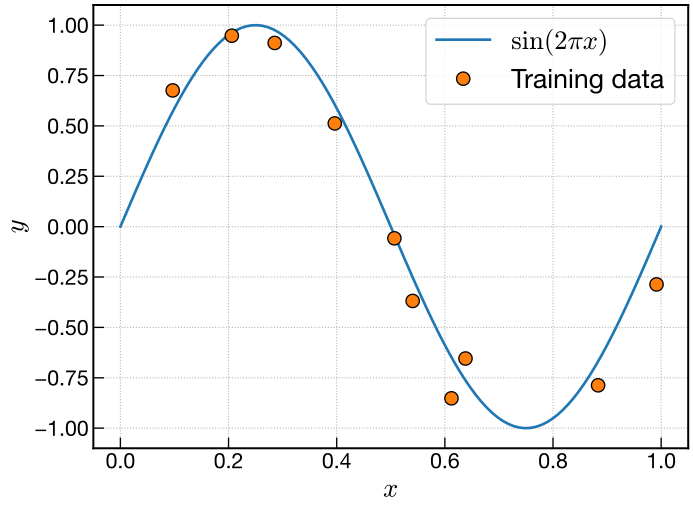
演習2:計画行列 #
復習と比較のために,演習:多項式回帰 と同様に計画行列を計算する関数を準備しておく.
def design_matrix(x, M):
    x_mat = x.reshape(-1, 1)    # 10行1列の2次元配列に変換
    p = np.arange(M + 1)        # 0, 1, 2, ..., M
    dmat = np.power(x_mat, p)
    return dmat
scikit-learn の PolynomialFeatures を使っても全く同じことができるので,練習がてら利用して,scikit-learnの使い方に慣れる.
PolynomialFeatures の簡単な例が下記.
test_x = np.array([1, 2, 3])    # 1次元配列
test_x = test_x.reshape(-1, 1)    # 3行1列の2次元配列にreshape
test_x    # juypterで出力用
出力
array([[1],
       [2],
       [3]])
これを入力に用いると
M = 3
test_pf = PolynomialFeatures(degree=M)      # インスタンスの作成
test_phi = test_pf.fit_transform(test_x)    # fitしてtransform.要するにここで多項式の特徴量を作成
test_phi    # juypterで出力用
出力
array([[ 1.,  1.,  1.,  1.],
       [ 1.,  2.,  4.,  8.],
       [ 1.,  3.,  9., 27.]])
このようにそれぞれの0乗,1乗,2乗,3乗のような多項式を特徴量とした行列が得られる.
上記の例を参考に,PolynomialFeatures を利用して計画行列を計算する関数を作成する.
def polymat(x, M):
    pf = ??????
    dmat = ??????
    return dmat
2通りの計画行列を計算する関数ができたら比較する.
M = 3
phi = design_matrix(x_train, M)    # NumPyで作った関数
phi    # jupyterで出力用
phi = polymat(x_train, M) # sklearnで作った関数
phi # jupyterで出力用どちらの出力も同じ結果になることを確認する.出力の一例.
array([[1.00000000e+00, 6.38195334e-01, 4.07293284e-01, 2.59932673e-01],
       [1.00000000e+00, 9.91459775e-01, 9.82992486e-01, 9.74597510e-01],
       [1.00000000e+00, 9.67294554e-02, 9.35658755e-03, 9.05057619e-04],
       [1.00000000e+00, 5.06704342e-01, 2.56749290e-01, 1.30095980e-01],
       [1.00000000e+00, 3.96438951e-01, 1.57163842e-01, 6.23058688e-02],
       [1.00000000e+00, 2.06016236e-01, 4.24426895e-02, 8.74388314e-03],
       [1.00000000e+00, 8.83368823e-01, 7.80340478e-01, 6.89328450e-01],
       [1.00000000e+00, 5.40482880e-01, 2.92121743e-01, 1.57886801e-01],
       [1.00000000e+00, 6.12204461e-01, 3.74794302e-01, 2.29450743e-01],
       [1.00000000e+00, 2.85361588e-01, 8.14312357e-02, 2.32373467e-02]])
演習3:LinearRegressionを用いた回帰 #
LinearRegression を用いて線形回帰を行う.
LinearRegression にはfit_interceptというキーワード引数があり,切片(定数項)を入れるか入れないかを指定できる.今回は \(x^0\) の特徴量が定数項に当たるため,fit_intercept=Falseを用いる.
使い方は PolynomialFeatures のときと同様で,まずインスタンスを生成し,そのあとfit()メソッドでフィッティングするときに,計画行列phiと訓練データy_trainを引数に入れるだけ.
lr = LinearRegression(fit_intercept=False)    # インスタンスの生成
lr.fit(phi, y_train)    # フィッティング
これで係数 \(\mathbf{w}\) が計算されてcoef_属性に格納されている.出力して確認すること.
lr.coef_ # jupyterで出力用例えば,出力は以下.
array([ -0.03188931, 10.38906877, -31.40759752, 20.92979435])また,今回はfit_intercept=Falseにしたので使わなかったが,切片(定数項)の値はintercept_属性に格納されている(今回は値はゼロ).
上記の係数 \(\mathbf{w}\) があれば予測モデルが計算できるので,演習:多項式回帰 と同様に \(\mathbf{y} = \Phi \mathbf{w}\) を利用して,自分で行列とベクトルの積を計算しても良いが,LinearRegression にはそれと同じ計算を行うpredict()メソッドがあるのでそれを使う.
連続的なx_denseの計画行列phi_denseをpredict()に入れて予測モデルを計算し,プロットする.
phi_dense = polymat(x_dense, M)
y_dense_predict = lr.predict(phi_dense)fig, ax = plt.subplots(1, 1)
ax.plot(x_dense, y_sin, label=r'$\sin(2\pi x)$')
ax.plot(x_train, y_train, 'o', markeredgecolor='black', label='Training data')
ax.plot(x_dense, y_dense_predict, label='Prediction')
ax.set_xlabel(r'$x$')
ax.set_ylabel(r'$y$')
ax.legend()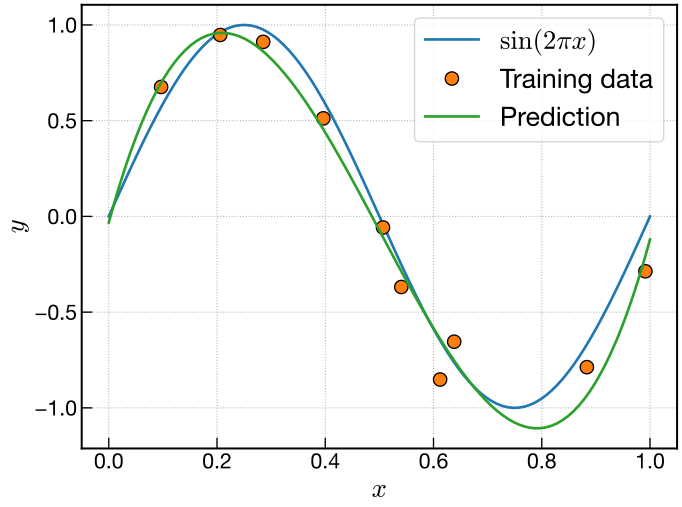
演習4:0次,1次,3次,9次の多項式回帰 #
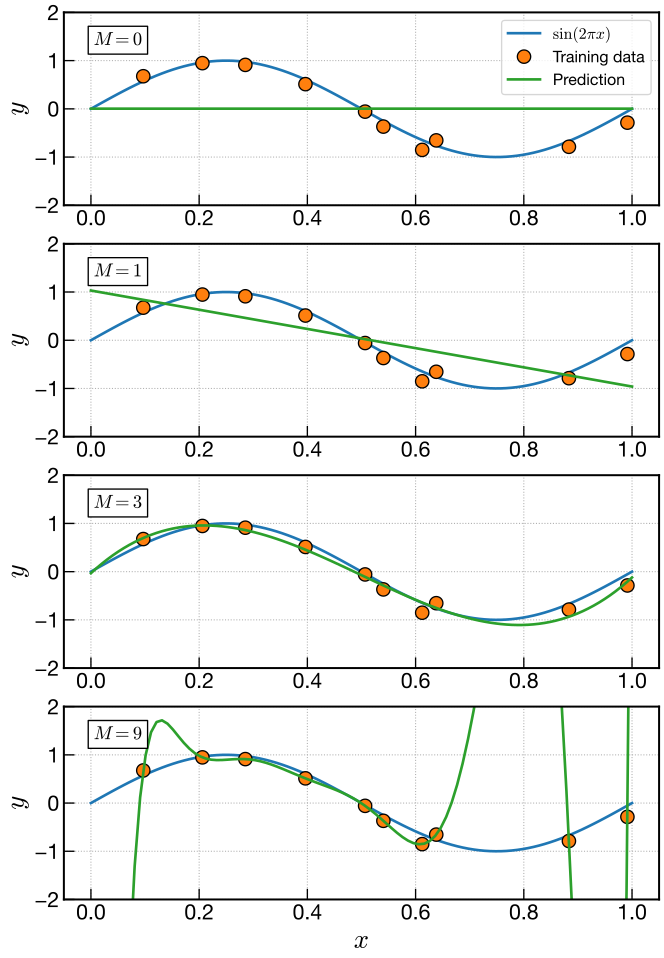
LinearRegression を用いて3次の回帰ができたら,0次,1次,3次,9次で同様に回帰を行い, まとめてグラフにプロットする.
# ---------- M = 0, 1, 3, 9
mlist = [0, 1, 3, 9]

# ---------- plot
fig, ax = plt.subplots(4, 1, figsize=(8, 12))
for i, M in enumerate(mlist):
    phi = ??????
    lr = ??????    # インスタンスの生成
    ??????    # フィッティング
    phi_dense = ??????
    y_dense_predict = ??????
    ax[i].plot(x_dense, y_sin, label=r'$\sin(2\pi x)$')
    ax[i].plot(x_train, y_train, 'o', markeredgecolor='black', label='Training data')
    ax[i].plot(x_dense, y_dense_predict, label='Prediction')
    ax[i].set_ylim(-2, 2)    # yの描画範囲を設定
    ax[i].set_ylabel(r'$y$')
    ax[i].text(    # M = 0などのテキストの表示
        0.05, 0.90,
        rf'$M = {M}$',
        transform=ax[i].transAxes,
        va='top',
        bbox=dict(facecolor='white'),
        fontsize=14
    )
ax[-1].set_xlabel(r'$x$')    # x軸ラベルは一番下のグラフだけに表示
ax[0].legend(fontsize=12)    # 一番上のグラフだけに凡例を表示.少しフォントを小さくしている